 Believers Sword
App guides / Desktop
Keep study notes you can understand next week
A useful note records more than a sentence that sounded good. Keep the passage reference, your observation, your question, and your response separate so that your future self can follow the thought.
Believers Sword editorial guide. Updated November 11, 2026.
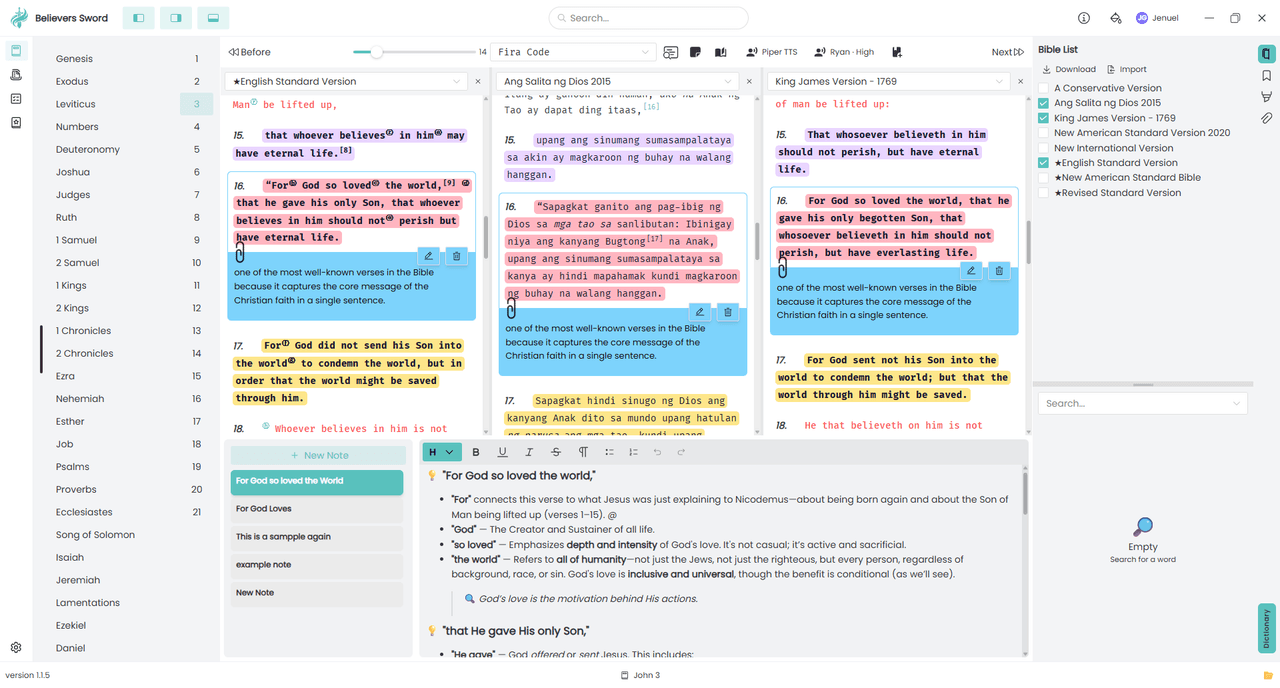
1. Choose a chapter note or a verse clip note
Use a chapter note for an outline, a list of questions, or a longer reflection. Use a clip note for a comment tied to one verse. The two features have different purposes, so choose the one that will help you find the thought later.
Open the passage first. For a longer note, show the notes panel, select Notes if the panel has tabs, and choose New Note. Give it a title that includes the passage and your question, such as John 3:14-18: what does believing mean here?
2. Use four simple prompts
Observation: what does the passage actually say? Record the speaker, listener, action, or repeated phrase. Question: what do you need to understand? Keep that question open when you do not yet have enough evidence.
Connection: which surrounding verse or other passage helps explain it? Write the reference so you can check it again. Response: what specific action follows from what you have understood? Keep your application distinct from a direct quotation of Scripture.
3. Attach a short thought to a verse
For a verse-specific comment, open the verse's context menu and choose Create Clip Note. Add your comment and use Save in the clip note dialog. Include the translation name when the comment depends on its particular wording.
A useful clip note might ask how John 3:16 connects to verses 14 and 15. It does not need to contain your entire study. Put the fuller explanation in a chapter note, where you can keep the paragraph together.
4. Check saving and return to the note
The chapter editor saves edits automatically. If a save warning appears, keep the app open and use Retry saving when available. Before leaving an important study, reopen the note and confirm that your latest text is present.
Local saving and cross-device sync are different. A note reopening on this desktop does not prove it reached another device. Keep a separate copy of important work before clearing application data, reinstalling, or moving to a new computer.
Try one small study
Create a note on John 3:14-18 with the four prompts above. Leave one honest question unanswered. Reopen it tomorrow, read the passage first, and add a dated follow-up rather than erasing the question that started your study.
Need help or found an error? Email me@jenuel.dev with the guide URL, your app version, and your platform. How we prepare our content.