 Believers Sword
App guides / Desktop
Compare translations without losing the passage
Two translations can help you slow down over a sentence you usually read quickly. Keep both on the same passage, notice a specific difference, and return to the surrounding verses before deciding what it means.
Believers Sword editorial guide. Updated November 11, 2026.
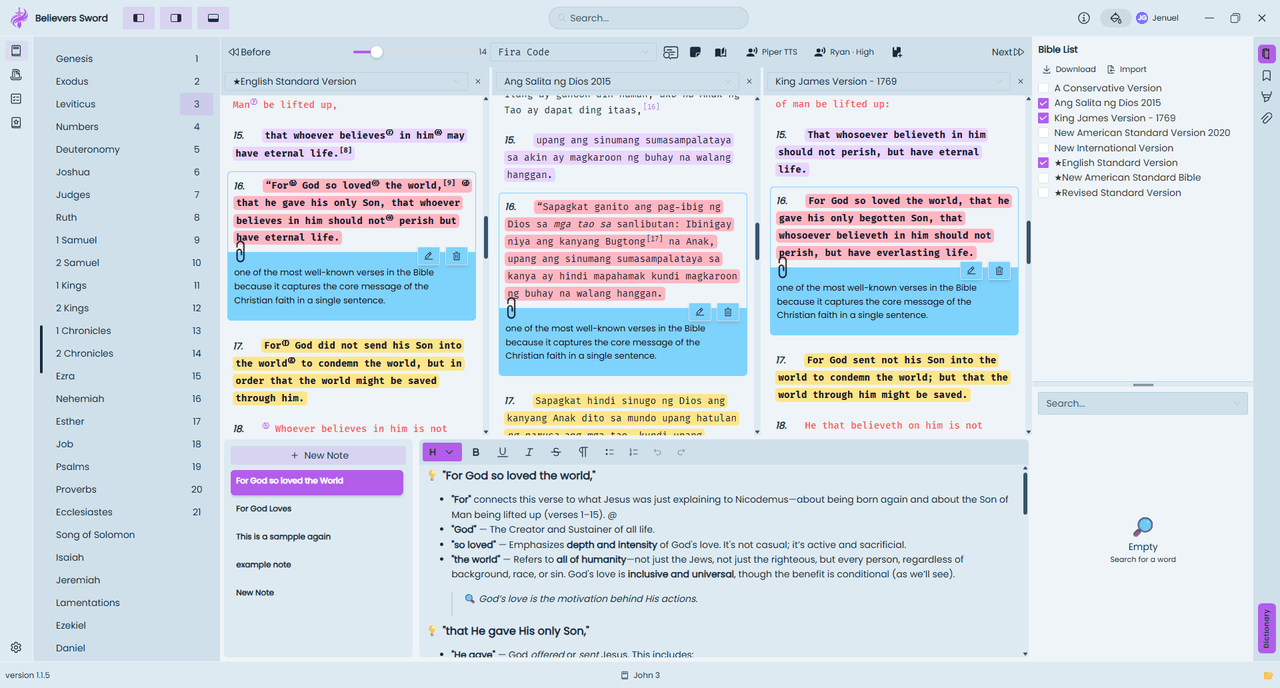
1. Start with two available translations
Install the versions you want to compare. Pick editions that include the same book and chapter. You can compare two versions in one language, or use a familiar translation alongside another language you read.
Open a short passage in the reader. John 3:14-18 is one useful starting point because the surrounding sentences help explain the familiar words in verse 16. Read the whole paragraph in your usual translation first.
2. Add a reading pane and choose its version
Use the add reading pane control in the desktop reader's toolbar. In current desktop builds, select the version name at the top of the new pane to open the version picker. Search the installed versions and choose your second translation.
Keep the same book and chapter open across the panes. If space is tight, use two panes and close extras with the close control in a pane header. More versions on screen do not necessarily make a comparison clearer.
3. Write down one difference and a question
Compare complete sentences rather than collecting isolated words. Does one version make a connection clearer? Does another preserve a phrase that makes you pause? Write the reference, the version names, and the question the difference raises.
Different English words can express the same meaning. A difference is a reason to investigate, not proof that one translation is wrong. Neither a vote among versions nor a preferred phrase settles a difficult interpretation by itself.
4. Check context and missing text
Read the verses before and after the sentence again in both versions. Look for who is speaking, who is listening, and words such as because, therefore, and but. Those connections often matter more than a striking word considered alone.
A blank pane can mean the edition does not include that passage or its text is unavailable. Confirm the book, chapter, installed version, and download before treating blank text as a meaningful translation difference. Save questions you cannot answer for further study.
Try one small study
Compare John 3:14-18 in two installed translations. Record one wording difference and one observation both versions support. Finish with a question you still need to check, rather than forcing an answer from the comparison alone.
Need help or found an error? Email me@jenuel.dev with the guide URL, your app version, and your platform. How we prepare our content.